

Rendering Mermaid and PlantUML diagrams with Sirena
Render flowcharts, UML diagrams, charts, and project timelines as SVG from Ruby, with themes and batch processing for publication workflows.
A publication can contain a process flowchart, a database model, a sequence of API calls, and a project timeline. Keeping those diagrams as text makes them easier to review alongside the document. Turning them into images should fit the document build just as naturally.
Sirena brings that step into Ruby. It renders Mermaid diagrams and a supported subset of PlantUML class and sequence diagrams as SVG, through a Ruby API or a command-line tool. You can describe decisions, grouped processes, class relationships, and nested interactions, then generate images for your publication without a browser or a Java toolchain in Sirena’s rendering runtime.
Choose the diagram that fits the document
In our welcome post, we introduced Claricle as an image suite for publication pipelines. Sirena creates images from diagram source, covering several kinds of information an author needs to explain.
| What you need to show | Mermaid diagram types |
|---|---|
| Processes, interactions, and data models | Flowchart, sequence, class, state, entity-relationship |
| Systems and their structure | C4, architecture, block, requirement |
| Schedules, histories, and work in progress | Gantt, timeline, Git graph, Kanban, user journey |
| Quantities and comparisons | Pie, Sankey, XY, quadrant, radar, treemap |
| Hierarchies and binary structures | Mindmap, packet |
These are different diagram languages with their own syntax; they share one rendering entry point in Sirena. The diagram reference provides syntax and examples for each type. PlantUML support focuses on class and sequence diagrams, rather than every PlantUML diagram language.
Flowcharts with decisions and branches
A useful flowchart needs more than two boxes. Mermaid flowcharts in Sirena can use different node shapes and separate paths to explain a process.
Save this example as diagram.mmd. It branches on the source notation,
then brings both rendering paths together before building the publication:
flowchart TD
  A[Receive document] --> B{Diagram source?}
  B --> C[Render Mermaid]
  B --> D[Render PlantUML]
  C --> E[Embed SVG]
  D --> E
  E --> F[Build publication]
Render it from the command line:
sirena render diagram.mmd -o diagram.svg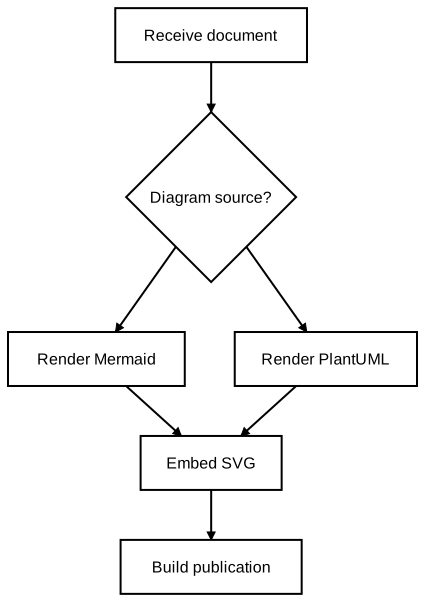
diagram.svg, showing the decision and two rendering paths.You can also render the same source inside an application:
require "sirena"

source = File.read("diagram.mmd")
svg = Sirena.render(source)
File.write("diagram.svg", svg)
The Ruby API returns an SVG string, so an application can save the image or
pass it directly to its document assembly step. For Mermaid flowcharts
that need a different placement strategy, the API also provides an optional
ELK layout through Sirena.render(source, layout_engine: :elk).
Sequence diagrams with actors and activations
Sequence diagrams can show the conditions around an exchange, not just the messages themselves. Sirena’s Mermaid sequence diagrams include participant aliases, activation bars, notes, and control blocks. The bundled PlantUML notation also handles actors, named participants, self-messages, activation, notes, and loops.
This PlantUML example shows a document build rendering each diagram in a
loop. An actor starts the build, activation bars show when the build and
renderer are working, and a self-message represents an internal step.
Save it as sequence.puml:
@startuml
title Rendering a document
actor Author
participant "Document build" as Build
participant Sirena
Author -> Build: Submit document
activate Build
loop Each diagram
  Build -> Sirena: Render source
  activate Sirena
  Sirena -> Sirena: Arrange elements
  Sirena --> Build: SVG diagram
  deactivate Sirena
end
note over Build,Sirena: SVG stays in the publication pipeline
Build --> Author: Document ready
deactivate Build
@enduml
Load the bundled notation when rendering:
sirena render --require sirena/notation/plantuml sequence.puml -o sequence.svg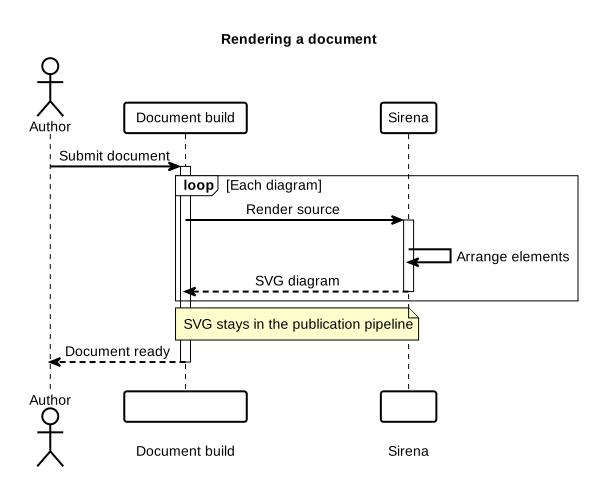
sequence.svg with an actor, activation bars, a self-message, a loop, and a spanning note.The Ruby version uses the same rendering entry point after loading the notation:
require "sirena"
require "sirena/notation/plantuml"

svg = Sirena.render(File.read("sequence.puml"), notation: :plantuml)
File.write("sequence.svg", svg)
Class diagrams with members and relationships
PlantUML class diagrams can describe more than class names. Sirena renders fields and methods, visibility markers, packages, and relationships such as inheritance and aggregation, including relationship labels and multiplicity.
For example, this source puts a document model inside a package, records its
members, and shows how a document contains diagrams. MermaidDiagram
inherits from Diagram:
@startuml
package Publication {
  class Document {
    +title : String
    +build()
  }
  class Diagram {
    +source : String
    +render()
  }
  class MermaidDiagram
  Document "1" o-- "*" Diagram : contains
  Diagram <|-- MermaidDiagram
}
@enduml
Save it as classes.puml and render it with the same PlantUML notation:
sirena render --require sirena/notation/plantuml classes.puml -o classes.svgMermaid class and entity-relationship diagrams offer other ways to describe object models and database relationships while keeping SVG as the output.
Themes for the destination
The same diagram may appear in a printed document or on a dark website.
Sirena provides default, light, dark, and high_contrast themes, along
with custom YAML themes. Select a theme through either the API or CLI:
sirena render diagram.mmd --theme dark -o diagram-dark.svgsvg = Sirena.render(source, theme: "dark")Choosing a theme during rendering lets you generate the image for its intended destination. SVG keeps shapes and text scalable when the document resizes the result.
Render a document’s diagrams together
A document build usually has several source files. Sirena’s batch command
recursively discovers diagrams and preserves their relative paths in the
output directory. Load the PlantUML notation to include both .mmd and
.puml sources:
sirena batch --require sirena/notation/plantuml -i docs/diagrams -o docs/imagesKeep the source files under docs/diagrams, generate their images under
docs/images, and reference those SVGs from the document. A failed diagram
does not stop the remaining files from being processed; the summary reports
successes and failures, and the command exits unsuccessfully if any diagram
failed. That gives the build a useful failure signal while showing which
files need attention.
For a pipeline that already produces source on standard output, single-file rendering can also read standard input and write SVG to standard output:
cat diagram.mmd | sirena render > diagram.svgSirena is designed for publication workflows, including SVG for embedding in Metanorma documents. Start with a representative diagram from your own project and check it in the final document. The repository examples and documentation provide more sources to adapt.